Freelance web designers
Diagnose a client's site in one check and send a professional update without writing it from scratch.
Loading...
AI Website Recovery Report
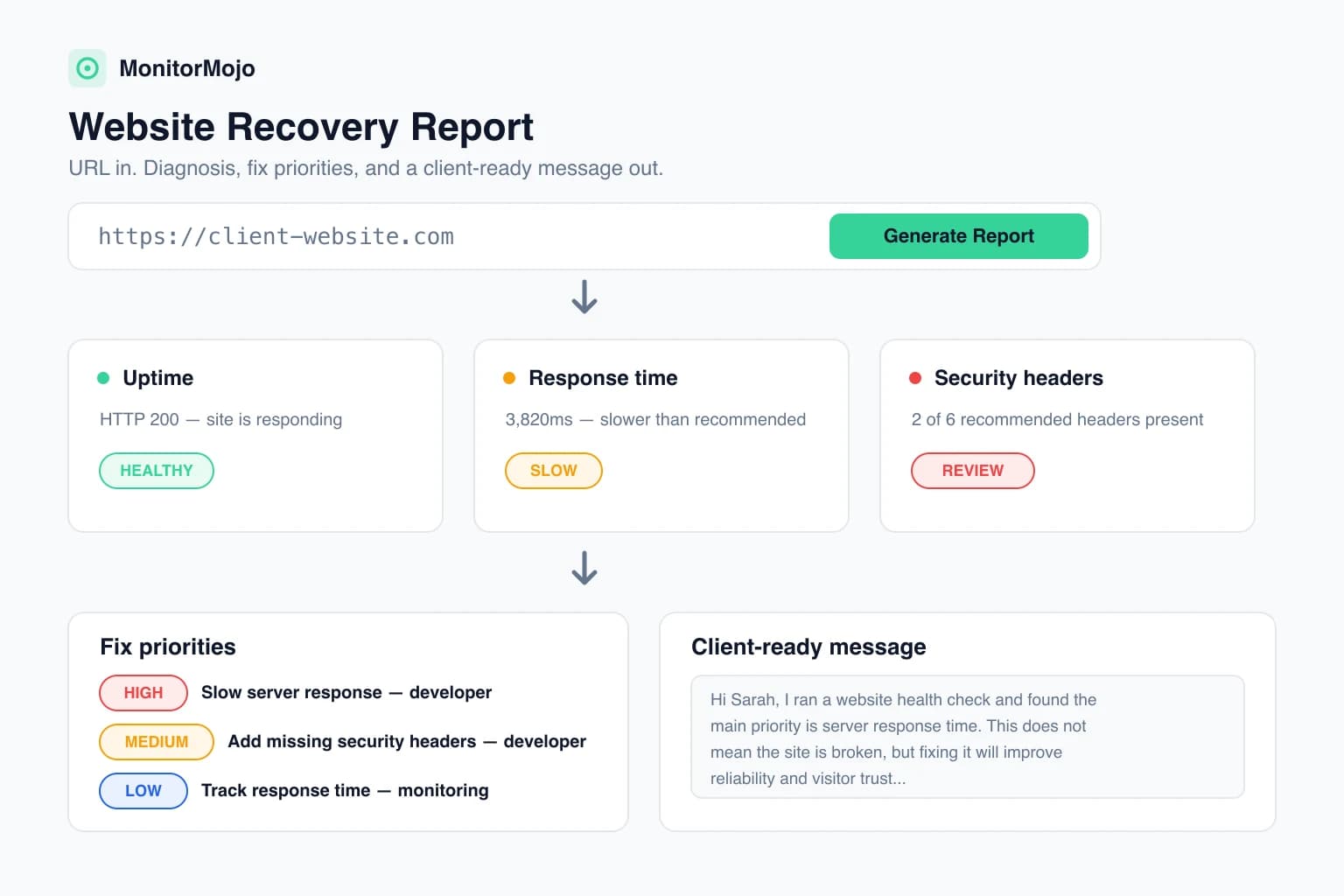
Enter a website URL. MonitorMojo checks uptime, response time, SSL, HTTPS, redirects, and security headers, then creates a plain-English report with fix priorities and a client-ready message.
MonitorMojo provides automated website checks and diagnostic guidance. Always verify issues before making production changes.
Free live website check
Enter any public website URL. MonitorMojo runs a live check and turns the results into fix priorities and a client-ready message. No login required.
MonitorMojo provides automated website checks and diagnostic guidance. Always verify issues before making production changes. Reports are generated on demand and optional client details stay in your browser session.
Who it's for
Diagnose a client's site in one check and send a professional update without writing it from scratch.
Standardize how your team explains website problems to clients across the whole portfolio.
Turn 'the site feels broken' tickets into a prioritized fix list you can act on.
Catch HTTPS, redirect, and response-time issues that quietly hurt rankings and trust.
Understand what is actually wrong before calling the developer or the host.
Check public pages that shape signups and support small-business clients with clear next steps.
What gets checked
Every report runs against the live site at the moment you check it — no cached results, no sample data.
A live server-side request confirms whether the site responds and which HTTP status it returns.
Measures how long the server took to respond and categorizes it as good, needs attention, or slow.
Confirms the site serves HTTPS, follows redirects safely, and reports the final URL.
Inspects certificate validity, issuer, and expiry window where inspection is possible.
Checks six recommended browser security headers, including HSTS, CSP, and X-Frame-Options.
Samples the returned HTML for a page title and an unusually small or empty body.
The recovery report
One clear verdict — healthy, warning, issue, or critical — backed by the raw signals.
What the results mean for the business, without jargon or fearmongering.
Every finding ranked critical to low, with why it matters and who should handle it.
A copyable step-by-step checklist a developer or maintainer can work through.
A calm, professional update you can copy and send to a client or stakeholder as-is.
The technical version: status codes, missing headers, redirect notes, and investigation steps.
Beyond red/green
A downtime alert tells you that something broke. It does not tell you what broke, why it matters, what to fix first, or what to say to the client waiting for an answer.
Example
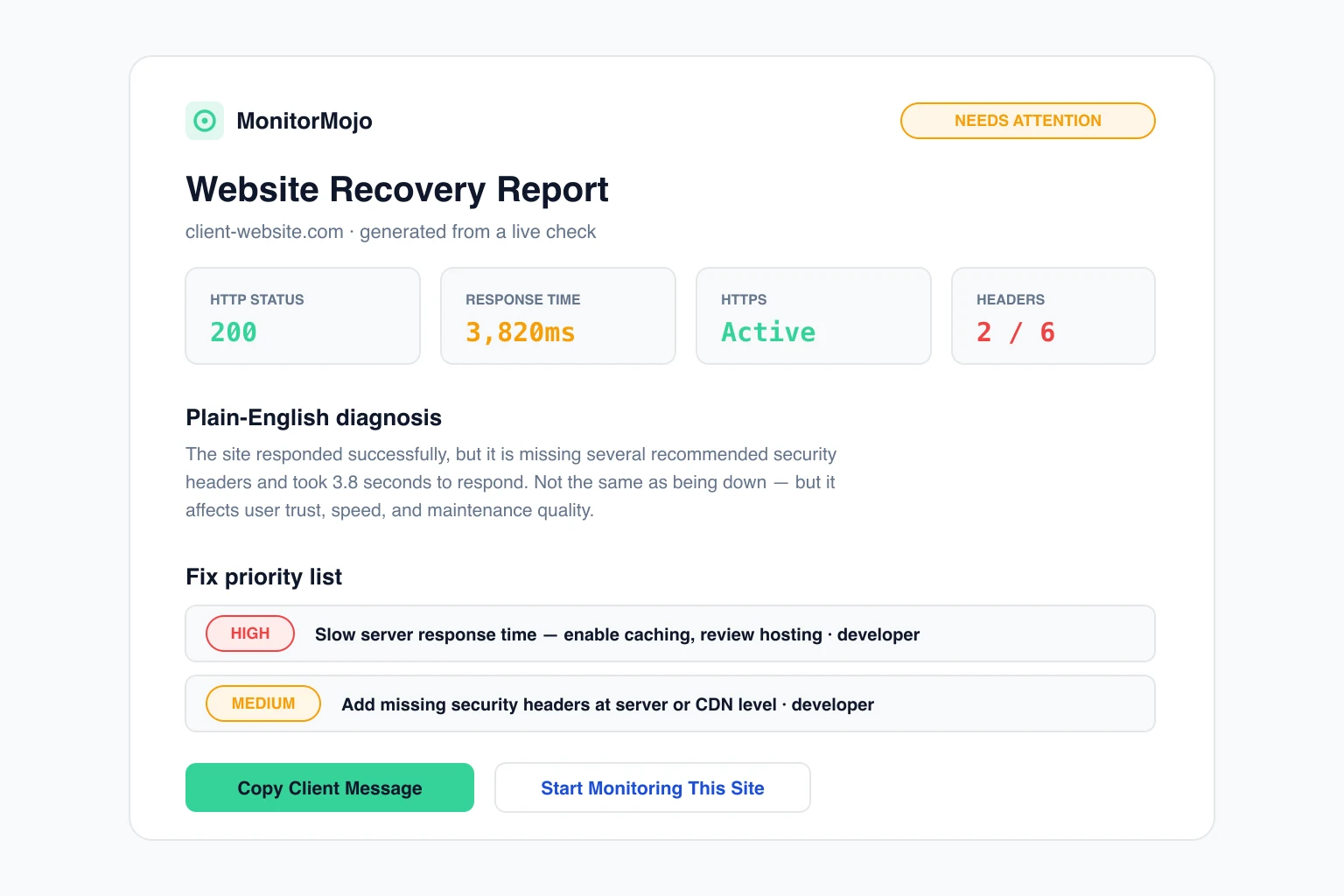
"Your site responded successfully, but it is missing several recommended security headers and took 3.8 seconds to respond. This is not the same as being down, but it may affect user trust, speed, and maintenance quality."
Fix first: slow server response time (developer) → missing security headers (developer) → track response time (monitoring)
Illustrative example — your report is generated from a live check of your URL.
After the report
A recovery report is a snapshot. Checking on a regular schedule turns it into a habit — so the next issue becomes a calm heads-up instead of an angry client email.
Running checks on a schedule with the dashboard, CLI, or API means the next outage shows up in your saved history before a client has to tell you.
Checking certificate expiry regularly turns renewal into a routine task instead of a surprise browser warning.
Response-time trends across saved checks reveal problems that a single check on a good day would miss.
A website recovery report is a live diagnostic of a website that goes beyond a red/green uptime check. MonitorMojo checks uptime, response time, SSL, HTTPS, redirects, and security headers, then turns the results into a plain-English diagnosis, a prioritized fix list, a technical checklist, and a client-ready message you can copy or print.
Yes. The report starts with a live server-side request to your URL. If the site does not respond or returns a server error, the report marks it as critical, explains likely causes, and tells you what to check first — hosting, DNS, or firewall configuration.
Yes. The report confirms whether the site serves HTTPS, whether HTTP redirects to HTTPS, and — where certificate inspection is possible — whether the SSL certificate is valid and when it expires. If deep certificate inspection is not available for a URL, the report says so honestly instead of guessing.
Yes. MonitorMojo checks six recommended browser security headers: Strict-Transport-Security, Content-Security-Policy, X-Frame-Options, X-Content-Type-Options, Referrer-Policy, and Permissions-Policy. Missing headers are treated as recommended improvements, not proof of a compromise.
No. The recovery report is automated diagnostic guidance based on live surface-level signals. It helps you understand and prioritize common issues, but it does not replace a professional security audit, incident response, compliance advice, or hands-on developer investigation. Always verify findings before making production changes.
Yes — that is exactly what it is built for. Add an optional client name and project label, and the report generates a calm, professional client-ready message plus a printable report you can share. Copying works without an account.
Yes. Every report ends with a monitoring recommendation and a Start Monitoring button that takes the site into your MonitorMojo dashboard, where checks use your credits. Continuous monitoring catches the next issue before your client does.
The report distinguishes between down and slow. If the site responds but takes over 1 second, it is flagged as needing attention; over 3 seconds is flagged as slow with likely causes such as missing caching, heavy plugins, or an underpowered host — plus concrete next steps and who should handle them.
Ready when the next site breaks
The check is free and takes seconds. When you want to check more sites on a regular basis, credit-based plans are one click away.