MonitorMojo Blog
Website Maintenance Monitoring: How Health Checks Fit Your Maintenance Workflow
Website maintenance and website monitoring are related but distinct practices. Maintenance covers the work you do to keep a site healthy — updates, backups, content changes, performance tuning. Monitoring covers the checks you run to confirm that the site is actually healthy from the visitor's perspective. Both are necessary, and they complement each other. A maintenance workflow without monitoring does not verify that the work is having the intended effect. Monitoring without maintenance tells you about problems without giving you a systematic process for addressing them. This expanded guide explains the practical monitoring workflow behind the topic, who should use it, what to check, how to document findings, and how to turn website health signals into useful client, developer, API, CLI, or AI-agent workflows without overstating what monitoring can prove.
What website maintenance actually involves
Website maintenance is a broad category that includes: software and plugin updates (keeping the CMS, themes, and plugins current to reduce security vulnerabilities), content updates (keeping information accurate and removing outdated content), performance optimization (reviewing and improving page load times), security checks (reviewing access logs, user accounts, and plugin configurations), backups (creating and verifying restore points), and renewal management (SSL certificates and domain registrations).
For agencies offering care plans, maintenance is the core of what is being delivered. The challenge is making the work visible to clients who do not experience it day-to-day. A site that has been well-maintained looks the same to the client as a site that has not been maintained — until something breaks.
Website health checks make maintenance outcomes visible. Running a check before and after a maintenance period shows the state of the site at both points. If something improves — response time is faster, a missing security header is now present — the check result documents that improvement.
When to run health checks during a maintenance workflow
The most useful times to run a website health check in a maintenance context are: before maintenance begins (establishing a baseline), after completing maintenance work (verifying the site is still healthy), before a client review or monthly report (getting current data), and immediately after any unexpected change or report of an issue.
Running a check before maintenance is particularly important because it helps distinguish between problems that existed before your work and problems that your work may have introduced. If a check after maintenance reveals a new issue, having the pre-maintenance baseline makes it clear when the issue appeared.
For agencies on monthly retainers, the check-before-and-after pattern is a useful way to document the care plan's impact: here is what the site looked like at the start of the month, here is what it looks like at the end of the month, and here is what changed in between.
What maintenance checks should always include
After any significant maintenance work, a health check should verify at minimum: that the site is still reachable, that HTTPS is active and the SSL certificate is unchanged, that response time has not degraded significantly, and that security headers are still in place. These are the most common signals that break silently after updates or configuration changes.
Plugin updates on WordPress sites are a frequent source of accidental changes to security header configuration, redirect rules, and caching behavior. A post-update health check catches these before the client or a visitor finds them.
For hosting or infrastructure changes, the check list should extend to verifying that the SSL certificate transferred correctly to the new environment, that the domain is resolving to the new server, and that any CDN or caching layer is serving the updated content.
Monitoring as proof of maintenance value
One of the long-standing challenges for website maintenance providers is demonstrating value to clients who cannot see the work being done. Plugin updates, database optimization, and security reviews do not create visible output that clients can point to and say 'yes, that is worth my monthly retainer.'
Health check results are one of the most direct ways to make maintenance value visible. A monthly report that includes a health check summary — all key signals reviewed and healthy, response time stable, SSL certificate current, no domain risk flags — shows the client that someone is watching their site and that the site is in good condition because of that attention.
If something was found and fixed during the month, the before-and-after data from health checks gives you concrete evidence: here is what the site looked like when the issue was identified, and here is what it looks like now that it has been addressed.
Integrating monitoring into a care plan structure
The most practical way to integrate website health checks into a care plan is to make them a defined deliverable. The care plan agreement should specify: how often health checks are run, which signals are reviewed, and how results are communicated to the client. This sets clear expectations and gives the maintenance provider a consistent process to follow.
Monthly is the minimum cadence that makes sense for most care plan clients. Weekly is appropriate for higher-tier plans or more active sites. The key is that the cadence is agreed and followed — not that health checks happen whenever someone remembers to run them.
Linking health check results to the monthly care plan report creates a natural structure for client communications: the report summarizes what was done during the month, what health checks revealed, and what the plan is for the coming month. This turns a potentially vague maintenance service into a structured, visible process.
What monitoring cannot replace
Website health monitoring catches technical signals — availability, SSL, response time, security headers, domain risk. It does not replace the maintenance work that keeps those signals healthy. A health check that shows an SSL certificate expiring in 14 days is useful only if someone acts on it.
Monitoring is also not a substitute for regular backups, software updates, or security audits. Those practices address different risks — data loss, known vulnerabilities, unauthorized access — that health checks do not evaluate. The combination of good maintenance practices and regular health checks is more effective than either alone.
For agencies, the clearest mental model is: maintenance is what you do to keep the site healthy, and monitoring is how you confirm it is working. Both are necessary parts of a comprehensive care plan.
What this workflow means
Website Maintenance Monitoring: How Health Checks Fit Your Maintenance Workflow is best understood as a repeatable website health workflow, not a promise that every outage or configuration issue will be avoided. Learn how website health checks fit into maintenance workflows — when to run them, what they catch, and how they turn reactive maintenance into proactive site management.
In practice, this workflow centers on uptime, SSL certificates, response time, security headers, website health summaries, and monthly review notes. Each check is planning input: it can show that the site is reachable, that a certificate has a given expiry window, that response time has shifted, or that a header is missing. It cannot prove root cause by itself or replace a human response. The value is in making the review consistent enough that site owners and small teams can spot issues before someone downstream has to ask about them.
Who should use this
This is most useful for site owners and small teams. The common thread is a small team doing a routine check before something breaks in front of a visitor, where a missed signal costs more than the few minutes it takes to check.
Beyond that primary audience, the same checks are reusable by anyone with a public-facing URL that matters to revenue, leads, or reputation: a recurring review is cheap insurance compared to hearing about the problem from a client or customer first.
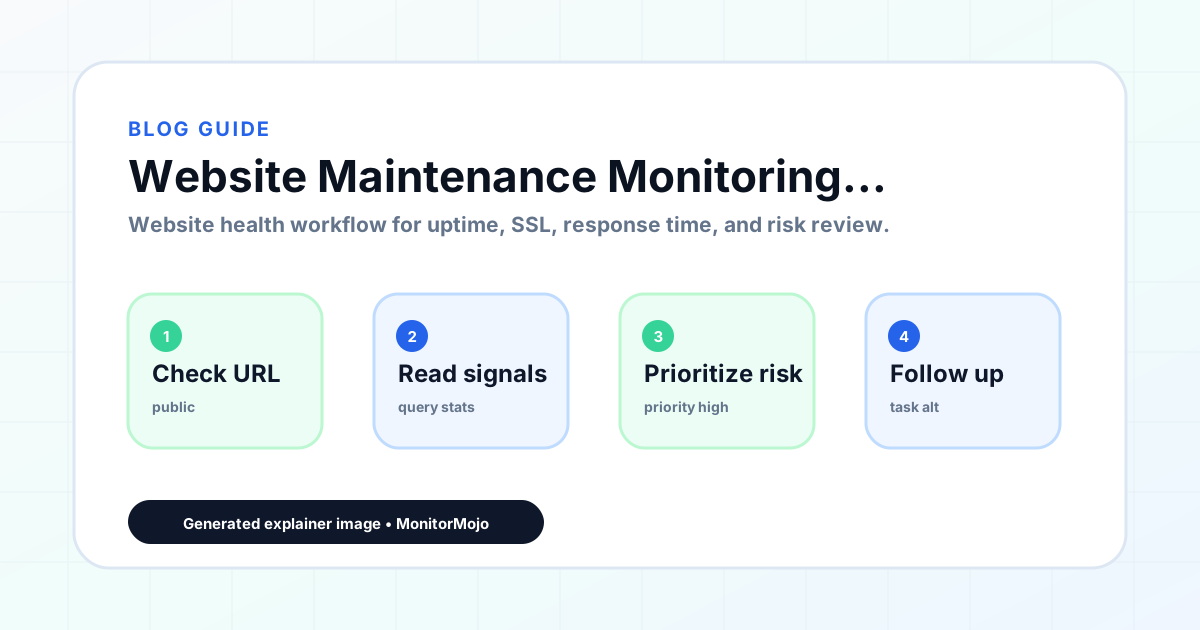
Step-by-step monitoring workflow
Start by listing the URLs that actually matter instead of just the homepage — for a small team doing a routine check before something breaks in front of a visitor, that usually means the pages tied to revenue, signups, or trust, not every page on the site.
Next, define the check types for each URL: reachability, HTTP status, HTTPS/SSL certificate status and expiry window, response time, redirect behavior, and security header presence. For API, CLI, and AI-agent workflows, document which endpoint or command runs the check and where the result is stored.
Set a cadence that matches the risk — a low-traffic page may only need a monthly look, while a page tied to revenue or signups deserves a check after every deployment and before any campaign or launch.
Record what you find with a consistent format: URL, check type, status, issue, owner, detected date, and next review date. Then say what actually happened in plain language — a check can surface a symptom, but site owners and small teams still need to confirm the cause.
- Choose the URLs that matter most to visitors, clients, revenue, and operations.
- Run uptime, SSL, response time, and security header checks on a consistent schedule.
- Triage failed or risky checks by likely owner: hosting, DNS, SSL, code, platform, or third party.
- Record notes in a repeatable format so future reviews do not start from scratch.
- Send a plain-language summary with the issue, impact, owner, and next review date.
- Run a confirmation check after remediation so there is an external result to reference.
Checklist or template
Use this template for recurring reviews: [URL], [Check Type], [Status], [Issue], [Priority], [Owner], [Detected Date], [Resolved Date], [Next Review Date]. Add a one-line summary at the top: what changed, what needs attention, and who owns the next step.
For site owners and small teams, group findings into the four signals that matter most: reachability, SSL status, response time, and security headers. Where nothing needs action, say the check found no issue in that area rather than implying full coverage.
- [URL]: the exact page or endpoint checked.
- [Check Type]: uptime, SSL, response time, headers, API, CLI, or agent workflow.
- [Status]: pass, review, failed, blocked, or needs human investigation.
- [Issue]: the observable symptom, not an unsupported root-cause claim.
- [Owner]: agency, developer, host, DNS provider, client, or third-party vendor.
- [Next Review Date]: when the team should confirm status again.
Common mistakes
The most common mistake is monitoring only the homepage while a checkout, signup, or booking flow silently breaks. Another is assuming SSL auto-renewal always works — it can fail quietly, and an external check is the only way to catch that before a browser warning does.
For site owners and small teams specifically, the recurring miss is treating one clean check as proof the whole site is fine, or fixing an issue without ever writing down what happened — which means the next person repeats the same investigation from zero.
- Tracking too many low-value URLs while missing the ones that matter.
- Skipping notes after an issue is resolved.
- Reporting a status without an owner or next step attached.
- Assuming automation can resolve an incident without human review.
- Treating one clean check as proof that every risk is covered.
Practical example
Consider a small team doing a routine check before something breaks in front of a visitor. A scheduled check flags that the site is slower than its usual baseline and that a security header is missing. Instead of guessing, the team logs the observation with a timestamp, assigns an owner, and re-checks after the fix ships — turning a vague "something feels off" into a specific, closed-loop task.
How MonitorMojo helps
MonitorMojo runs website health checks that combine reachability, SSL certificate status, response time, and security header presence in one workspace, so this workflow doesn't require stitching together several separate tools.
The API and CLI make the same checks scriptable for site owners and small teams who want them wired into an existing process, while credit-based checks keep it practical to run reviews exactly when they matter — before a client call, after a deploy, or when someone asks whether the site is healthy. Results still depend on hosting, DNS, and how quickly the responsible team acts on what the check finds.
Frequently Asked Questions
How often should I run website health checks as part of a maintenance plan?
Monthly is a reasonable minimum for most care plan clients. Run a check at the start and end of each maintenance period. Also run a check after any significant update, migration, or configuration change, and immediately when a client reports an issue.
What is the difference between website maintenance and website monitoring?
Website maintenance is the proactive work done to keep a site healthy — updates, backups, optimization, renewal management. Website monitoring is the regular checking of health signals — reachability, SSL, response time, security — to confirm the site is in good condition. Both are complementary parts of a comprehensive care plan.
What website signals should I check after a WordPress update?
After a WordPress core update or plugin update, check: reachability (the site loads correctly), SSL status (HTTPS is still active), response time (performance has not degraded), security headers (plugin configuration changes have not removed headers), and redirect behavior (any important redirects still work).
Can health check results be included in care plan reports?
Yes. MonitorMojo check results can be used directly in client reports. The data can be presented at whatever technical level is appropriate for the client — detailed signal breakdowns for technical clients, plain-language summaries for non-technical ones.
How do I explain the value of website monitoring to a client who just wants updates and backups?
Frame monitoring as quality control for the maintenance work. Updates and backups keep the site healthy in theory. Health checks confirm it is healthy in practice. The combination is what gives clients the confidence that the care plan is actually working — not just the hope that it is.
Can this prevent every issue with the site?
No. Monitoring helps site owners and small teams detect website health signals and organize follow-up, but it does not prevent every outage, SSL issue, slow response, or third-party failure. The result still depends on hosting, DNS, infrastructure, and how quickly the responsible team investigates and responds.